
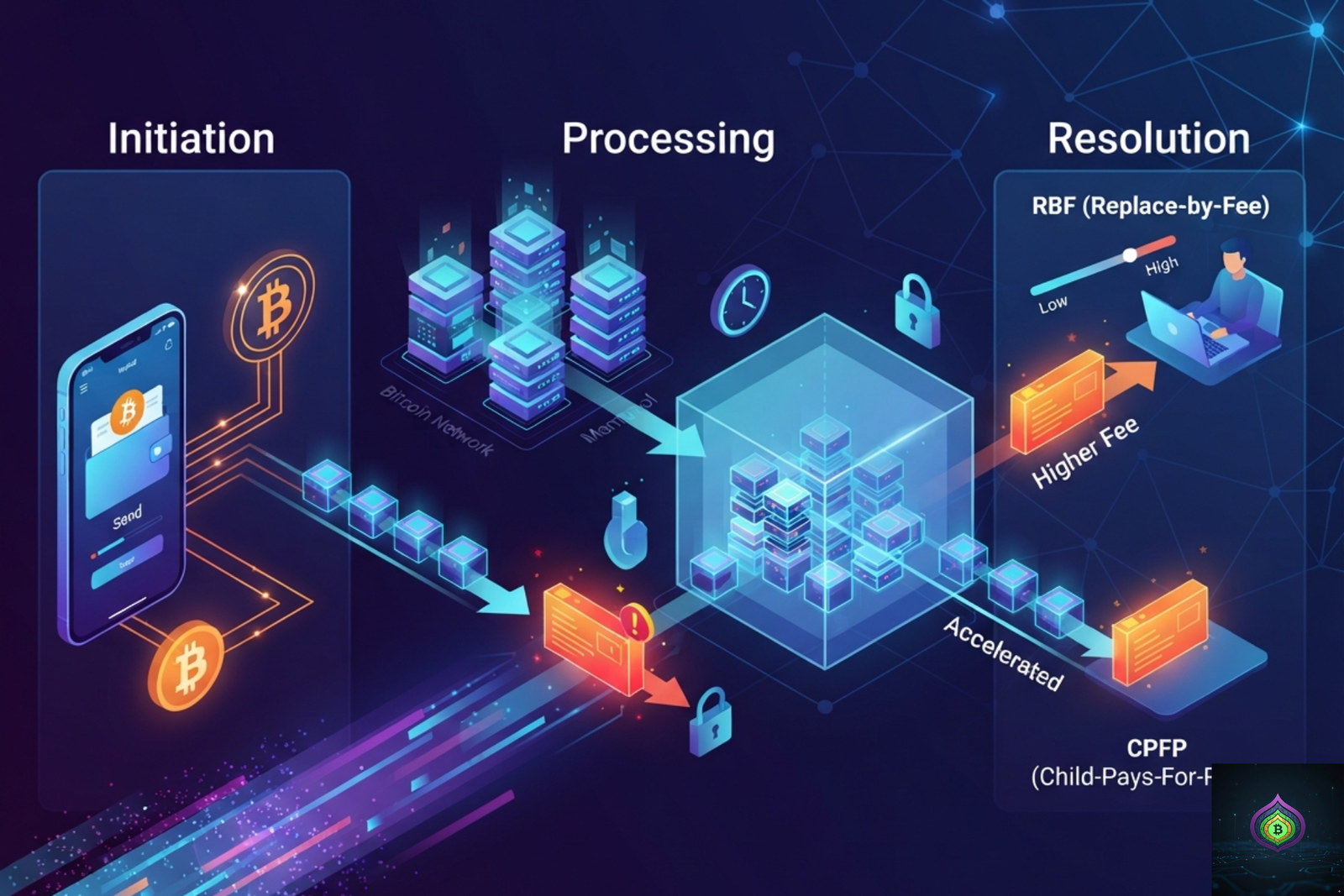
Your Bitcoin is sent but hanging in limbo. Is it gone? Will it come back? Can you speed it up? Every answer you need — right here.
You’ve done it. You hit send on a Bitcoin transaction, watched the wallet show it as “pending” — and then nothing. Minutes pass. Hours pass. Maybe even days. The transaction shows up as unconfirmed in the blockchain explorer, and you’re left staring at it, wondering if your Bitcoin has just vanished into thin air.
Take a breath. This is one of the most common and most misunderstood situations in crypto. The short answer to what if a Bitcoin transaction is never confirmed is: your Bitcoin is not lost. But there are important things happening in the background — and there are real steps you can take to resolve it. Let’s break the whole thing down, clearly and calmly.
How Bitcoin Transaction Confirmation Actually Works?
Before diving into what happens when a transaction gets stuck, it helps to understand what’s supposed to happen in a normal Bitcoin transaction.
When you send Bitcoin, your transaction doesn’t go directly to the recipient. It first gets broadcast to the Bitcoin mempool — short for memory pool — which is essentially a waiting room where all unconfirmed transactions sit until miners pick them up. Miners select transactions from the mempool to include in the next block, typically prioritizing those with the highest fee per byte (measured in satoshis per virtual byte, or sat/vB).
Once a miner includes your transaction in a block and that block is added to the blockchain, your transaction receives its first confirmation. Each subsequent block adds another confirmation. Most wallets and exchanges consider a Bitcoin transaction fully settled after 3 to 6 confirmations, which typically takes 30 minutes to an hour.
📌 Key Concept: The Bitcoin mempool is a competitive queue. Transactions compete for limited block space (approximately 1–4 MB per block). The higher your fee, the faster miners pick your transaction. The lower your fee, the longer you wait — especially during periods of high network activity.
Why Bitcoin Transactions Get Stuck Unconfirmed
There are several reasons a transaction can get stuck in the mempool for hours, days, or even longer. Understanding your specific cause helps you pick the right solution.
1. Fee Too Low
This is the most common culprit by far. If you set a transaction fee lower than the current mempool’s going rate, miners have no incentive to include your transaction when there are higher-paying ones waiting. Your transaction sits in the queue, deprioritized, until either fees drop network-wide or you take action to boost the fee.
2. Network Congestion
During periods of intense Bitcoin activity — major price movements, popular NFT mints, post-halving speculation — the mempool can swell to hundreds of thousands of transactions. Even transactions with reasonable fees can experience significant delays because the queue is simply overwhelming the available block space. Sites like mempool.space show the real-time state of the mempool and recommended fee rates.
3. Wallet Misconfiguration
Some wallets automatically set low fees to save users money — which is fine in normal conditions but becomes a problem during high-demand periods. Legacy wallets or browser-based wallet interfaces sometimes use outdated fee estimates that don’t reflect current mempool conditions.
4. Transaction Batching Issues
If your transaction was part of a batch sent by an exchange or payment processor, a delay in any part of the batch can hold up the entire set. This is more common with exchange withdrawals during busy periods.
⚠️ Important: An unconfirmed transaction is NOT a failed transaction. Your Bitcoin has not been sent to the recipient yet, but it has also not left your wallet permanently. It exists in a state of suspension — and that state is resolvable.
What Actually Happens If It’s Never Confirmed?
Here’s the part most people don’t realize: Bitcoin transactions don’t stay in the mempool forever. The mempool is not permanent storage — it’s a temporary holding area maintained by Bitcoin nodes. Most Bitcoin nodes are configured to drop unconfirmed transactions after 72 to 336 hours (3 to 14 days), depending on their settings.
When a transaction is dropped from the mempool, something important happens: the Bitcoin returns to your wallet as if the transaction never existed. The coins are not lost. They never actually left your wallet in a permanent sense — because a blockchain transaction only truly settles when it’s confirmed in a block. An unconfirmed transaction is, cryptographically speaking, just a signed note of intent that hasn’t been executed yet.
⏱️ Timeline Reality: Most transactions that get stuck due to low fees either confirm within 24–48 hours as congestion clears, or get dropped from the mempool after roughly 72 hours (3 days) on standard node configurations, after which the BTC reappears in your wallet balance.
However, there’s an important nuance: while your transaction is still in the mempool — even if it’s been there for days — it can still be confirmed if a miner happens to pick it up. Some miners run nodes with longer memory windows and occasionally clear old low-fee transactions during periods of low congestion. So don’t assume it’s dropped just because time has passed. Always check a blockchain explorer first.
The 3 Ways to Rescue a Stuck Bitcoin Transaction
You don’t have to sit and wait. There are active solutions — and the right one depends on whether your wallet supports certain features.
1. Replace-By-Fee (RBF) — The Fastest Fix
RBF is a Bitcoin protocol feature that allows you to rebroadcast the same transaction with a higher fee, effectively replacing the stuck version in the mempool. Miners will immediately see the new, higher-fee version and prioritize it over the old one. The original low-fee transaction is then invalidated.
To use RBF, your transaction must have been broadcast with the RBF flag enabled — which most modern wallets (Electrum, BlueWallet, Sparrow, and many others) do by default. Look for a “Bump Fee” or “Replace Transaction” option in your wallet. Set the new fee to at least the current recommended rate shown on mempool.space for your desired confirmation speed.
✅ Best Option: RBF is the cleanest, fastest resolution. It replaces your stuck transaction with a properly-priced one, typically confirming within the next 1–3 blocks once broadcast with the correct fee.
2. Child Pays for Parent (CPFP) — When You’re the Recipient
If you’re the person receiving an unconfirmed transaction, or if your wallet doesn’t support RBF, Child Pays for Parent (CPFP) is your tool. CPFP works by creating a new transaction that spends the unconfirmed outputs from the stuck transaction — and sets a high enough fee on this child transaction that when miners calculate the combined fee rate for both the parent and child, it becomes profitable to confirm both together.
This works because miners see both transactions as a package: “If I confirm the parent, I get both fees.” Wallets like Electrum and Sparrow support CPFP natively. Some exchanges will apply CPFP to stuck withdrawal transactions if you contact their support team and provide the transaction ID.
✅ Good Option for Recipients: CPFP lets you accelerate a transaction you didn’t send — useful when waiting for exchange withdrawal or payment confirmation that’s stuck.
3. Wait for the Mempool to Clear — The Passive Option
If your transaction doesn’t support RBF and you’re not the recipient, your remaining option is patience. Bitcoin’s mempool regularly oscillates between congested and nearly empty — particularly over weekends when trading volume tends to drop. During low-congestion windows, even very low-fee transactions that have been stuck for days can suddenly confirm.
Monitor the mempool at mempool.space and watch the minimum fee rate for the next block. When it drops below your transaction’s fee rate, there’s a good chance your transaction will confirm soon.
Patience Play: If your transaction fee is, say, 2 sat/vB but the current minimum is 5 sat/vB — watch for weekend evenings or low-volume periods when the minimum drops back below 2. Historically this happens regularly in most market conditions.
What If the Transaction Is Finally Dropped?
If your transaction is eventually dropped from the mempool after the node’s retention window expires, the situation resolves itself automatically. Your wallet will show the funds as available again — because in the eyes of the Bitcoin blockchain, the transaction never happened. No confirmation means no settlement.
There is one important exception: if you broadcast the transaction from an exchange or third-party custodial wallet, the platform may show your funds as “in transit” until they manually resolve the failed transaction on their end. In this case, contacting the platform’s support team with your transaction ID is the right next step.
⚠️ Don’t Try to Double-Spend: Some users attempt to send a second transaction spending the same inputs as the stuck one, hoping miners will pick up the new one. Without RBF support, most nodes will reject this as a double-spend attempt. Stick to RBF or CPFP for legitimate fee bumping.
How to Prevent This From Happening Again
The best fix for a stuck transaction is never having one in the first place. Here’s how experienced Bitcoin users avoid the problem:
- Always check mempool.space before sending — look at the current recommended fee rate for your desired confirmation speed (next block vs within an hour vs within a day)
- Use wallets with dynamic fee estimation — modern wallets like Sparrow, BlueWallet, and Electrum update fee recommendations in real time based on current mempool conditions
- Enable RBF by default — most serious Bitcoin wallets offer this option; make sure it’s on so you always have the ability to bump fees if needed
- Avoid sending during high-congestion events — major price moves, Bitcoin halving days, and institutional buying frenzies drive mempool congestion through the roof
- For urgent transactions, use ‘High Priority’ or ‘Next Block’ fee settings — the extra cost is usually worth it when timing matters
- Use SegWit or Taproot addresses — transactions from these address types are smaller in byte size, meaning the same fee rate costs less in absolute terms
💡 Pro Tool: Mempool.space is the best free tool for monitoring Bitcoin network conditions. It shows real-time fee recommendations, your transaction’s position in the queue, estimated confirmation time, and a live visualization of the mempool — essential for any active Bitcoin user.
🔒 Stuck Transaction? Stay Calm — Your Bitcoin Is Safe.
An unconfirmed Bitcoin transaction is a frustrating experience — but it is never a catastrophic one. Your Bitcoin is not lost, not stolen, and not gone. It’s either queued up waiting for a miner, or it will eventually return to your wallet if the mempool drops it. The key is knowing what you’re looking at and what tools are available to you.
The Bitcoin network is built to be robust and self-correcting. Mempool dynamics are complex but predictable — and once you understand them, the panic disappears and strategy takes over.
✅ Bookmark mempool.space — check it before every Bitcoin send.
✅ Enable RBF in your wallet settings today so you’re always prepared.
✅ If a transaction is stuck, use RBF or CPFP — don’t panic and don’t wait blind.
✅ Contact exchange support with your TXID if funds are stuck on a custodial platform.
👉 Share this guide with anyone who’s ever panicked over a stuck Bitcoin transaction. The more people understand how the mempool works, the fewer unnecessary support tickets — and the fewer sleepless nights.
Frequently Asked Questions
1. Will my Bitcoin be lost if a transaction is never confirmed?
No — Bitcoin is not lost if a transaction goes unconfirmed. A Bitcoin transaction only truly settles when it’s included in a confirmed block on the blockchain. Until then, the coins technically remain under the control of the sender’s wallet. If the transaction is eventually dropped from the mempool (typically after 3–14 days depending on node settings), the Bitcoin simply reappears as available in your wallet, as if the transaction never happened.
2. How long can a Bitcoin transaction stay unconfirmed?
A Bitcoin transaction can technically remain in the mempool for as long as nodes choose to keep it — typically between 72 hours and 336 hours (14 days) on standard full node configurations. During periods of very low network activity, some old transactions may linger longer. In practice, most stuck transactions either confirm within 24–72 hours as congestion eases, or get dropped from the mempool after a few days and return the funds to the sender.
3. What is Replace-By-Fee (RBF) and how do I use it?
Replace-By-Fee (RBF) is a Bitcoin protocol feature that lets you rebroadcast a stuck transaction with a higher fee, replacing the low-fee version in the mempool and incentivizing miners to prioritize it. To use RBF, your original transaction must have been sent with the RBF flag enabled (most modern wallets like Electrum, BlueWallet, and Sparrow enable this by default). Look for a ‘Bump Fee,’ ‘Speed Up,’ or ‘Replace Transaction’ button in your wallet’s transaction history. Set the new fee to the current recommended rate from mempool.space for your desired confirmation speed.
4. Can the recipient spend unconfirmed Bitcoin?
No — standard Bitcoin wallets and all reputable exchanges require at least one confirmation (and usually 3–6) before treating received funds as spendable. Attempting to spend zero-confirmation Bitcoin is technically possible in some setups but is unsafe because the transaction could be replaced (via RBF) or dropped. Merchants and exchanges that accept zero-confirmation transactions are taking a risk — which is why most don’t.
5. What should I do if my exchange withdrawal is stuck unconfirmed?
If your Bitcoin withdrawal from an exchange is stuck unconfirmed, first check the transaction ID (TXID) on mempool.space to confirm the status and see the current fee rate attached. If the fee is below the current minimum accepted by most miners, contact the exchange’s support team with your TXID and request a fee bump. Reputable exchanges can apply CPFP (Child Pays for Parent) to accelerate the transaction on their end. While waiting, avoid resending or canceling — let the exchange support team handle it to prevent complications.